Showing posts with label NodeJS. Show all posts

Wednesday, August 30, 2017

Managing Multiple environments in a Hybrid Cloud

With the shift from traditional Client Server Application Software to Cloud Aware Application many Software Engineers have found themselves dusting off old System Administration Books from college. With multiple services running on multiple machine or containers software engineers have to be able to manage their applications across more and more complex environments. As I have been talking to some of my customers I have found common pain points in managing these complex applications: 
  • Consistency between environments
  • Single point of failure services
  • Differing environment requirements  (Not all environments are created equal)
  • Managing multiple environments across multiple clouds
All of these factors and many more can lead to time wasted, applications being released into production before their time, or worst of all unhappy software engineers.

DevOps to the rescue?

Wouldn't it be nice if the software engineer just worried about their application and its code, instead of all of the environments that it has to run on? In some places that is exactly what happens. Developers develop on their local laptops or in a development cloud and then check in their code and it moves to production. DevOps cleans up any problems with applications using single instance bottle-necked services, out of sync versions of centralized services, or adding load balancing services to the front end or back end of the application. The App developers have no clue what mess they have caused with their code changes, or a new version of service that they are using. Somehow we need to make sure that the application developer is still connected to the application architecture but disconnected  from the complexity of managing multiple environments.

Single Definition Multiple Environments

Working on my Local machine

One approach that I have been looking at is having the ability to define my application as a set of service templates. In this simple example I have a simple Node JS application that uses Redis and MongoDB. If I use a yaml format. It might look something like this.

  1. MyApp:     
  2.   Services:  
  3.     web: NodeJS  
  4.       ports: 80  
  5.       links: mqueue, database  
  6.     mqueue: Redis  
  7.       ports: 6789  
  8.     database: MongoDB  
  9.       ports: 25678, 31502  


So with this definition I would like to deploy my application on my local box, using Virtual Box. I put this yaml file in my home directory of the application. This should be very familiar to those of you that have used docker-compose. Now I should be able to launch my application on my local machine using a command similar to docker-compose.
$ c3 up
After a couple of minutes my multi-service application is running on my local laptop.
I can change the application code and even make changes to the services that I need to work with.

Working in a Development Cloud

Now that I have it running on my laptop I want to make sure that I can run it in a cloud. Most organizations work with development clouds. Typically development clouds are not as big as production and test clouds but give the developer a good place to try out new code and debug problems found in production and test environments. Ideally the developer should use the same application definition and just point to another environment to launch the application.
$ c3 up --env=Dev
This launches the same application in the development environment. Which could be a OpenStack, VMWare or Kubernetes based SDI solution. The developer really does not care about how the infrastructure gets provisioned, just that it is done quickly and reliably. On quick inspection we see a slight difference in the services that are running in the development cloud. There is another instance of the NodeJS service running. This comes from the service definition of the NodeJS service. The NodeJS service is defined to have multiple instance in the development cloud and only one instance in the local environment.

NodeJS.yml - Service Definition
  1. NodeJS:  
  2.   Local:  
  3.    web:  
  4.       image: node-3.0.2  
  5.       port: 1337  
  6.   Dev:  
  7.     web:  
  8.      image: node-3.0.2  
  9.      port: 1337  
  10.     worker:  
  11.      image: node-3.0.2  
  12.      port:1338  
  13.      cardinality: 3  
  14.   Test: …  
  15.   Prod: …  
This definition is produced by the service and stack developer not the application developer. So the service can be reused by several developers and can be defined for different environments (Local, Dev, Test, & Production). This ensures that services are defined for the different requirements of the environments. For example Production NodeJS might have a NGNX load balancer on the front end of it for serving up NodeJS web services for each user logged in. The key is that this is defined for the Service
that is reused. This increases re-usability and quality at the same time.

Working in the Test Cloud

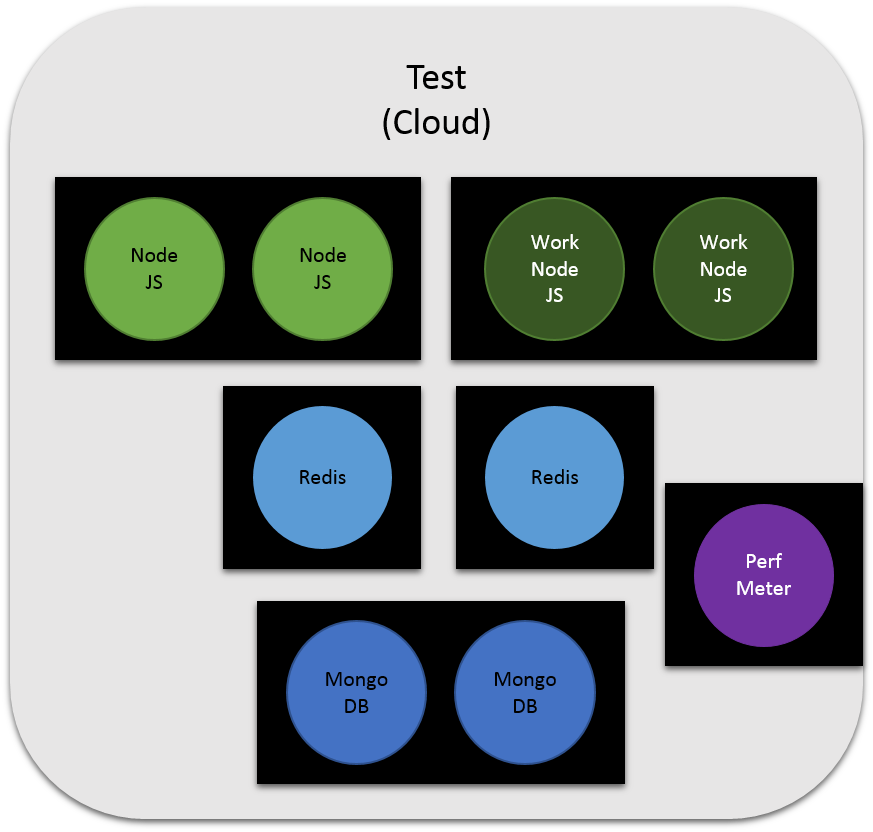
Now that I have tried my application in the development cloud. It is time to run it through a series of tests before it gets pushed to production. This is just as easy for the developer as working in the development cloud.
$ c3 up --env=Test
$ c3 run --env=Test --exec runTestSuites
We launched the environment and then run the test suites in that environment. When the environment launches you can see additional instances of the same services we have seen before in the development cloud. Additionally, there is a new service running in the environment. The Perf Monitor Service is also running. It is monitoring the performance of the services while the tests are running. Where did the definition of this service come from? It came from the application stack definition. This definition just like the service definition can show that the application can have a different service landscape for each environment. But the software developer still sees them as the same. That is to say, code should not change based on the environment that is running the application. This decouples the application from the environment and frees up the software developer to focus on code and not environments.

What about Production 

The ultimate goal of course is to get the application into production. Some organizations, the smart ones, don't let developers publish directly into production without some gates to pass thru. So instead of just calling "c3 up --env=Prod" we have a publish mechanism that versions the application, its configurations and supporting services.
$ c3 publish --version=1.0.2
In this case the application is published and tagged with version 1.0.2. Once the application is published, it will then launch the environment if it is not currently running. If it is running then it will "upgrade the service" to the new version. The upgrade process will be covered in another blog. Needless to say it allows for rolling updates with minimum or no downtime. As you can see additional services have been added and some taken away from the test environment.

Happy "Coder" Happy Company

The software engineer in this story focuses on writing software not on the environment. Services are being reused from application to application. Environment requirements are being met with service and application definitions. Stack and service developers are focusing on writing services for reuse instead of fixing application developers code. Now your company can run fast and deploy quality products into production,

Check out more detailed architecture and use cases on github at https://github.com/CAADE/C3/wiki.

You can see the video of this blog here


DWP

Tuesday, August 29, 2017

Building Microservices with SailsJS and NodeJS

I have been developing applications with uServices for sometime. Each time I wrote a new application I could not figure out where to put the uService Definitions. They tended to be spread all over my source tree. Since I was writing my application using sailsjs I wanted to follow the convention over configurability paradigm that they espouse in sails.

Here are some of the things that I tried.


  • api/workers directory - Using the sails_hook_publisher & sails_hook_subscriber
  • api/jobs directory - similar to the workers pattern but using grunt to run processes.
  • deploy directory - Using the micro npm module.

Workers


This method uses the sails_hook_publisher & sails_hook_subscriber plugins to give each instance the ability to subscribe to jobs that are are requested from another service. It assumes that you are using redis as the message queue. And it does not handle the management of starting/stopping or replicating services. It is a good solution but it had the overhead of a full sails application with each worker. It also tied the logical to the deployment models too tightly for me.

Jobs


Very similar to the publish/subscribe worker paradigm but I wanted a light weight mechanism for spinning up small services without all of the overhead of the sails stack. So I basically just fired up small node js scripts that I stored in the jobs directory. Problems with this is lack of flexibility of the micro-service architecture and coupling with the application code.

Deploy


Using the micro npm package to create simple micro services that can handle a HTTP request. I created simple micro services that performed specific tasks for the application. Creating the micro services was actually very simple thanks to the micro package. But Deploying multiple micro services can be hard manage. So I looked to docker and containers to help with this.

I had to come up with a strategy to define/code my microservices, how they would be managed and deployed. I had to remember the key software engineering principles of Cohesion, Decoupling and Reuse in my architecture. So the first thing I worked on was decoupling the microservice deployment from the microservice source code itself.

This gave me the flexibility to change my deployment architecture from source code itself. To do this I looked at defining my deployment architecture using docker both DockerFile and docker compose file formations. To define a microservice I had to do the following.


  • create a package.json file with all of the packages needed to run my microservice
  • create a Dockerfile to build the image of my microservice
  • add the microservice to a docker-compose file for the application.

package.json


The package.json file contains the npm packages that my microservice depends on as well as an scripts that are needed to manage my microservice including a build and deploy script. Note that when I build my microservice image I tag it with a local registry service using "localhost:5000/appName/userviceName" where appName is the name of the application and userviceName is the name of the microservice that I am creating. This is just an example of a naming convention that I like to use. If I was creating a microservice that I was going to use over and over again I would use a different name. The deploy target pushes the image into the local registry so I can use the image in the docker swarm that I am running.

 {
  "main": "index.js",
  "scripts": {
    "start": "micro",
    "build": "docker build . -t localhost:5000/appName/userviceName",
    "deploy": "docker push localhost:5000/appName/userviceName"
  },
  "dependencies": {
    "micro": "latest",
    "node-fetch": "latest"
  }

Dockerfile

The dockerfile in this case is very simple. I am writing all of my micro-services in node so I start with the base image. Next I simply copy the package.json file to an application directory and I copy any of the source code into the application directory. Then I call "npm install" this will install all of the packaging that are required by my micro-service for the image. Then the last statement launchs the microservice by calling "npm start".

FROM  node:latest
RUN mkdir -p /usr/src/app
WORKDIR /usr/src/app
COPY package.json /usr/src/app/
RUN npm install
COPY . /usr/src/app
EXPOSE 3000
CMD npm start

docker-compose.yaml

The docker-compose.yaml file contains the services and their deployment configurations for the application. For my application I have a simple web server that is the main microservice for my application. It is a sailsjs application. I try to always name my web interface micro-service "web". It is easy for me to find them later. Again in the file below I have appName as the name of the application. Also you can see the micro-service definition is runing 5 replicas and the image is the same one as defined in the Dockerfile above.

version: '3'
services:
  mongo:
    image: mongo
    expose:
         - 27017
    ports:
         - "27017:27017"
  appName:
    image: localhost:5000/appName/web
    expose:
      - 1337
    ports:
      - "1337:1337"
  userviceName:
    image: localhost:5000/appName/userviceName
    deploy:
            mode: replicated
            replicas: 5

Bouquet Generator implementation

I have created a sails generator to generate the directory heiarchy as well as simple micro-services that you can use as a starting point for your own micro-service application check out the documernation at https://github.com/madajaju/bouquet/tree/master/sails-generate-bouquet-uservice. Or you can install it by installing the node.
# npm install sails-generate-bouquet-uservice --save.


I hope this helps you with your journey to building your own sails application using micro-services.
For more information on the Bouquet sails generators check out my previous blog post at https://darrenpulsipher.blogspot.com/2017/05/resurrecting-bouquet_3.html.

DWP

Wednesday, May 3, 2017

Resurrecting Bouquet

Bouquet

In the 1990s I started dabbling with a new kind of system analysis. Object Oriented System Analysis. I quickly became familiar with all of the great OOA/D tools. The one that stood out for me was Rational Rose. I dove right in and over time became quiet proficient in using the tool. I quickly started writing scripts to to make my life easier and automate repeated tasks. This was the birth of a project named Bouquet.
Move forward 20 years. I am still using UML to design and architect systems, but I also use rapid prototyping technologies like sails, rails and grails. Most recently I am focusing on NodeJS/SailsJS development. I dusted off my old Bouquet specs and started working on resurrecting Bouquet with the latest technologies.
These are the technologies that I am leveraging this time.
  • PlantUML - Textual way of describing UML diagrams
  • SailsJS - MVC framework for NodeJS development
  • Commander - npm module for command line programming for NodeJS
  • GitHub MD - Markdown language for projects in GitHub.
The tools by themselves are very useful. Bringing all the tools together is where I found the most benefit.

PlantUML

PlantUML is a component that lets you quickly write several UML diagrams using Text instead of a drawing tool. It is great for many but not all of the UML diagrams. I have found that it covers everything that I typically need to do for Architectures of systems. UseCase, Component, Class, Deployment, Scenarios, and Activity Diagrams.
One of the benefits of using PlantUML that the text files that your create (*.puml) can be checked in to GitHub. You can also generate image files (png) from the text files (puml) and check in the image files as well. I do this so my design documents in GitHub (Markdown language is used) can reference the images that have been generated. Generating the image (png) files is as easy as typing in a command line.
# java -f design/plantuml.jar myDiagram.puml
Because I am using NodeJS. I can use a npm script command to actually generate all of the my images. Basically I put another target in my package.json file in the root directory that searches all of my design directories and generates the png files.
  "scripts": {
  ...
  "design": "java -jar design/plantuml.jar design/*.puml design/**/*.puml",
  ...
  }
Now you can generate png files for all of your design diagrams, just type.
# npm run-script design 
To find out more about PlantUML click here You can download the latest jar file for quick image generation here. There is also a Plugin for PlantUML for Intellij and several other IDEs.

SailsJS

SailsJS is a MVC convention over configuration framework for NodeJS applications. This uses a common pattern that can be found in several programming languages today. Examples include Ruby o Rails, and Groovy on Grails.

Commander

Commander is a nodejs module for command-line processing. I use this to develop command line interfaces for the systems that I architect. This gives me a quick and dirty way of providing a command line interface with very little lifting.

GitHub MD

MD - Markdown language is used to quickly and easily document a git hub repository. The language allows for simple text based documentation to make it quick and easy.

Bouquet

Using the concept of convention over configurability of SailsJS, I extended the same concepts that already exist in SailsJS and created a design and bin directory in the project root directory. This gives me a place to put the design of the architecture as well as the CLI (Command Line interface) of the system being architected. This is important because most of the architectures I am working have a Web, REST and CLI .

Directory Hierarchy

After a SailsJS project is created a standard directory hierarchy contains several directories and files. I added two additional directories to the top level (bin, design, and test). Next, I add corresponding subdirectories in the design directory as shown below.
  • api - Standard SailsJS directory
  • assets - Standard SailsJS Directory
  • bin - Contains commander binaries
  • config - Stanard SailsJS Directory
  • design - Contains Architecture and Design of the system
    • Actors - Actors of the system
      • README.md - ReadMe for all of the Actors
      • < Actor Name > - Directory for each Actor of the system
    • UseCases - Use Cases of the system
      • README.md - ReadMe file for all of the UseCases
      • UseCases.puml - PlantUML file for all of the Use Cases and Actors
      • < UseCase Name > - Directory for each Use Case of the system
    • Systems - System Components
      • README.md - ReadMe for all of the sub-systems
      • < Sub System Name > - Directory for each sub system.
    • README.md - Top ReadMe for the Architecture and Design
    • Architecture.puml - Top level architecture plantUML diagram
    • plantuml.####.jar - plantUML jar file used to generate png files.
  • tasks - Standard SailsJS Directory
  • test - Contains test for the system.
    • bin - Test the CLI
    • Actors - Test the Actor interactions One Test Suite per Actor with each use case
    • UseCases - Test the Scenarios as described. One Test Suite per Scenario with tests for each different path through the scenario
    • System - Test of each subsystem. One Test Suite for each SubSystem, a test for each of the interface calls.
  • views - Stand SailsJS Directory

Future 

I know as I start using this I will add more generated artifacts to the system. So if you have any ideas please let me know. You can find more at the github project

Additional Blogs in a series of Bouquet Blogs

Monday, June 22, 2015

Running tests in a CI system for SailsJS

I recently started working with SailsJS. I am enjoying some of the libraries and how easy and fast it is to get things up and running. But I do miss some of the built in tools that come with Grails. A good example of this is the "grails test" tool. This made it easy to run unit level tests, integration or functional tests from the command line with the same command line for all of my projects.

grails test-app 

This made it very easy to integrate into a CI tool like TeamCity. I didn't need any special scripts, relative paths or some dark art of getting environment variables right. Things just worked out of the box.

Since SailsJS lets you plug in any testing you want. AKA it does not come built into the framework. I had to figure out how to run the tests in my IDE (Intellij in this case), and in my CI system (TeamCity). As you can see I am trying to keep the tool set in the same family.

I decided to use Mocha as the test framework. It seemed to have everything that I wanted and was the closest to what I was familiar with in the grails framework. But the commands to get it running were a little more than just typing "sailjs test" in my application directory. But I found a cool little trick to make it easy. Using npm and my package.json file. I can use the same command for both CI and IDE.

By simply adding a line to the package.json file in the root directory of the application source I can then call

npm test

Here is an example of my package.json file.

...
  "sails-mongo": "^0.11.1"},
"scripts": {
  "start": "node app.js",
  "test": "node ./node_modules/mocha/bin/_mocha --recursive --ui bdd ./test",
  "debug": "node debug app.js"},
"main": "app.js",
...


The test script calls the node command with the proper mocha script to run my tests. Notice that the path to the mocha script is relative to the application root directory. It is important in the IDE and CI that you set the working directory to the application root. Which should be the default for both. Now I can simply call:

npm test

from the command line, in the IDE, or in the CI system.

DWP